
5 Best Free Broken Link Checker Tools for Website SEO Audits in 2026
Broken links are easy to overlook, especially when you manage a website with hundreds of pages, old blog posts, and external references.
A product page gets deleted, a resource changes its URL, or an external website goes offline. Your visitors click a link and end up on a 404 error page.
I recommend checking these issues regularly instead of waiting for someone to report them.
The good news? You don't always need expensive SEO software. Several free broken link checker tools can identify dead URLs, HTTP errors, and linking problems.
I've shortlisted five tools based on their features, free-access limits, and suitability for different SEO tasks.
5 Best Free Broken Link Checker Tools Compared
If you want a quick recommendation, here's how the five tools compare.
|
Tool |
Best for |
Free access |
Installation |
|
GUESTPOSTLINKS |
Website link audits |
Free online tool |
No |
|
Screaming Frog |
Technical SEO crawling |
500 URLs per crawl |
Yes |
|
Ahrefs |
Auditing verified websites |
5,000 crawl credits/month |
No |
|
BrokenLinkCheck.com |
Finding broken links in HTML |
3,000 pages |
No |
|
W3C Link Checker |
Link validation |
Free online utility |
No |
My recommendation: For a quick browser-based check, start with GUESTPOSTLINKS or BrokenLinkCheck.com. If you need a broader technical SEO audit, Screaming Frog and Ahrefs provide additional diagnostic features.
1. GUESTPOSTLINKS Broken Link Checker — Best for Website Link Audits
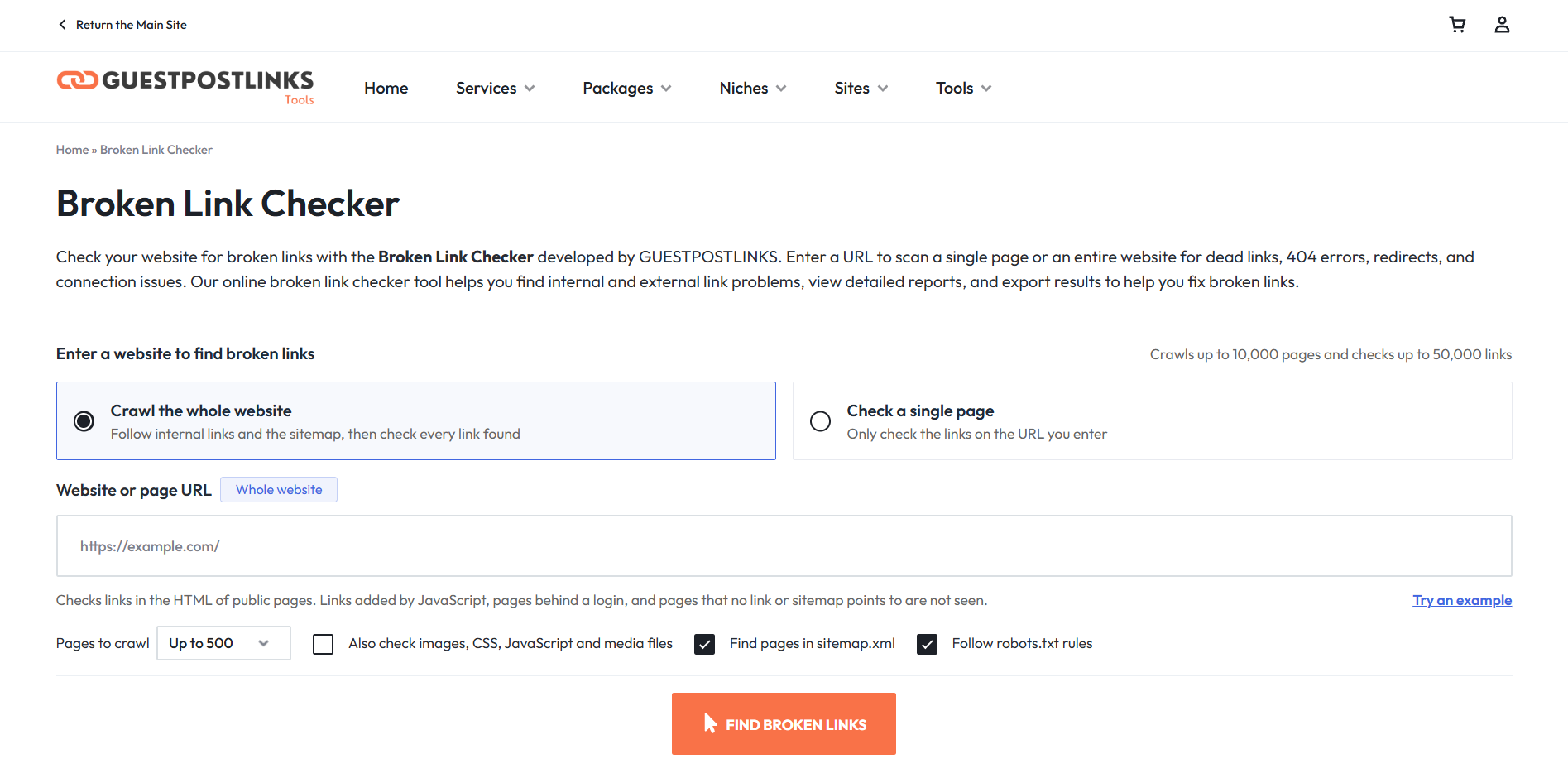
GUESTPOSTLINKS offers a free online Broken Link Checker that helps website owners identify broken internal and external links without installing desktop software.
I recommend it for bloggers, small business owners, SEO freelancers, and agencies that want to check link problems before making website updates.
Key features
- Single-page and whole-site scanning: Check a specific page or multiple pages across your website.
- Internal and external link checking: Identify broken links pointing to your own pages or third-party websites.
- HTTP error detection: Review 404 errors, server errors, and redirects.
- Connection issue reporting: Investigate failed requests, timeouts, and other access problems.
- CSV reports: Export scan results for review and follow-up.
Practical example
Suppose you manage an affiliate blog with 250 articles. Some older posts still link to products that are no longer available.
Instead of opening every article manually, you can run a website scan and review the reported link errors.
For example:
|
Reported issue |
Recommended action |
|
Product URL returns 404 |
Replace it with an active product URL |
|
Internal guide was moved |
Update the link to its new location |
|
External resource is unavailable |
Find an alternative source |
|
Link redirects multiple times |
Update it to the correct final URL |
This is particularly useful when preparing a website for a content refresh or client SEO audit.
Best for: Bloggers, SEO freelancers, website owners, and agencies looking for a browser-based link auditing tool.
Limitation: Automated scans can sometimes flag websites that block crawlers. I recommend manually checking suspicious results before changing links.
2. Screaming Frog SEO Spider — Best for Technical SEO Professionals
Screaming Frog SEO Spider is one of my preferred options when an audit needs more than broken link detection.
Its free version crawls up to 500 URLs, making it suitable for smaller websites or targeted audits.
Unlike basic online checkers, Screaming Frog also provides technical SEO data about redirects, page titles, metadata, and response codes.
Key features
- Crawl up to 500 URLs for free.
- Identify 404 errors and other HTTP response codes.
- Find source pages containing broken links.
- Review redirects and server errors.
- Export broken-link data for fixing issues.
Practical example
Imagine auditing a 300-page service website after a redesign.
Several old service URLs may have changed, but navigation menus and blog posts still point to the previous addresses.
In Screaming Frog, you can:
- Enter the website URL and start the crawl.
- Open Response Codes.
- Filter by Client Error (4XX).
- Review the affected URLs and their inlinks.
- Export the findings for your developer.
Best for: Technical SEO specialists, agencies, and website developers.
Limitation: The free version has a 500-URL crawl limit. Advanced crawling and configuration features require a paid licence.
3. Ahrefs — Best for Auditing Verified Websites
Ahrefs is useful when you want to investigate broken links alongside other technical SEO issues.
Its free account provides Site Audit access for websites you can verify ownership of, with 5,000 crawl credits per month per project.
I recommend it for website owners who want recurring technical SEO checks rather than only a one-time broken link report.
Key features
- Crawl verified websites for technical SEO issues.
- Identify pages linking to broken destinations.
- Review internal linking problems.
- Check external link status when the relevant crawl setting is enabled.
- Monitor issues through Site Audit reports.
Practical example
Suppose you manage an ecommerce website and recently removed several discontinued product pages.
You can run Ahrefs Site Audit to identify internal links pointing to those removed URLs.
Then review whether each link should be updated, removed, or directed to a relevant replacement page.
Best for: Website owners, in-house SEO teams, and marketers who want link checks within a broader audit.
Limitation: Free Site Audit access requires website ownership verification. Some Site Explorer broken-link research features are not included in the free account.
4. BrokenLinkCheck.com — Best for Finding Broken Links in HTML
BrokenLinkCheck.com is a browser-based tool that checks websites for dead links.
One feature I find useful is its ability to show where a broken hyperlink appears in the page's HTML.
Its free version supports checking up to 3,000 pages.
Key features
- Scan internal and external links.
- Identify broken URLs and HTTP errors.
- Locate problematic hyperlinks in HTML.
- Check websites without installing software.
- Review broken links across multiple pages.
Practical example
Imagine a blog article containing 40 references to research reports, tutorials, and external websites.
The checker reports a broken research link and shows where it appears in the HTML.
Instead of searching through the entire article, you can locate the reference and replace it with an active source.
Best for: Bloggers, content editors, and website managers who need to locate broken hyperlinks.
Limitation: The free version is limited to 3,000 pages, and the interface is more focused on link checking than broader technical SEO reporting.
5. W3C Link Checker — Best for Link Validation
The W3C Link Checker is a free utility listed among the World Wide Web Consortium's developer tools.
I recommend it for developers and technical website owners who need straightforward link validation.
Unlike full SEO platforms, it focuses on checking links rather than providing a complete website optimization dashboard.
Key features
- Check web pages for broken references.
- Identify link validation problems.
- Support technical website quality checks.
- Provide a free alternative to commercial SEO software.
Practical example
Suppose you're reviewing a newly published resource page containing links to official documentation.
Before promoting the page, you can use a link validator to check whether the references are accessible.
This helps catch incorrect URLs before readers encounter them.
Best for: Developers, technical editors, and website administrators.
Limitation: It is a link validation utility, not a complete SEO audit platform with keyword research, rankings, or backlink analysis.
How to Check Broken Links on Your Website for Free
When I review a website's links, I focus on two questions: Which URLs are broken, and where are those URLs linked from?
Finding a 404 is only the first step. You also need to know which pages require changes.
Here's a simple process:
- Enter your website URL. Use a free online checker or website crawler.
- Choose the scan scope. Check one page or crawl multiple pages.
- Review HTTP status codes. Look for 404, 410, and 5xx responses.
- Find the source pages. Identify where each broken URL appears.
- Fix and recheck. Update the affected links and run another scan.
Example: If /blog/seo-checklist-2024/ no longer exists but 12 articles still link to it, update those links to the correct destination rather than fixing only one occurrence.
How to Fix Broken Links Found During an SEO Audit
Not every reported error requires the same fix.
|
Link issue |
What I recommend |
|
Broken internal link |
Update it to the correct working URL |
|
Deleted page with a suitable replacement |
Set up a 301 redirect |
|
Broken external reference |
Replace it with a relevant, active source |
|
500 or 503 server error |
Check server logs and retry |
|
Redirect chain |
Link directly to the final destination |
|
Intentionally deleted page |
Remove outdated internal references; a genuine 404 or 410 may be appropriate |
One important distinction: a 404 response isn't automatically an SEO problem. Google recognizes that pages can be intentionally removed. The issue worth fixing is often the broken link pointing to that page.
Which Free Broken Link Checker Should You Choose?
For a quick online audit, I'd start with GUESTPOSTLINKS or BrokenLinkCheck.com.
For technical SEO investigations, I'd choose Screaming Frog. If I own the website and want a broader recurring audit, Ahrefs is another useful option.
For straightforward link validation, W3C Link Checker is worth considering.
The best choice depends on your website size, the reports you need, and whether you prefer browser-based or desktop software.
Final Verdict
You don't need an expensive SEO subscription just to find broken links.
For a straightforward online check, GUESTPOSTLINKS Broken Link Checker is a practical starting point. Screaming Frog is better suited to technical crawls, while Ahrefs offers broader auditing for verified websites.
Whichever tool you choose, prioritize fixing links that affect important pages and visitor journeys. A clean link report is useful, but correcting the actual problems is what matters.
Frequently Asked Questions
What is the best free broken link checker in 2026?
GUESTPOSTLINKS and BrokenLinkCheck.com are useful for online checks, while Screaming Frog is suitable for more detailed technical audits. The best option depends on your scan size and reporting requirements.
Can I check broken links without installing software?
Yes. Browser-based tools let you enter a website URL and scan links without downloading desktop software.
Do broken links affect Google rankings?
Broken links don't automatically cause ranking penalties. However, they can affect navigation, prevent visitors from reaching useful content, and make important pages harder to access through internal links.
How often should I check for broken links?
I recommend monthly checks for active websites and additional audits after redesigns, migrations, or major content updates. Larger websites may benefit from more frequent checks.
Are free broken link checkers accurate?
They can identify many common errors, but no crawler is perfect. Security restrictions, temporary outages, and rate limits can produce misleading results. Always verify important errors before making changes.

