
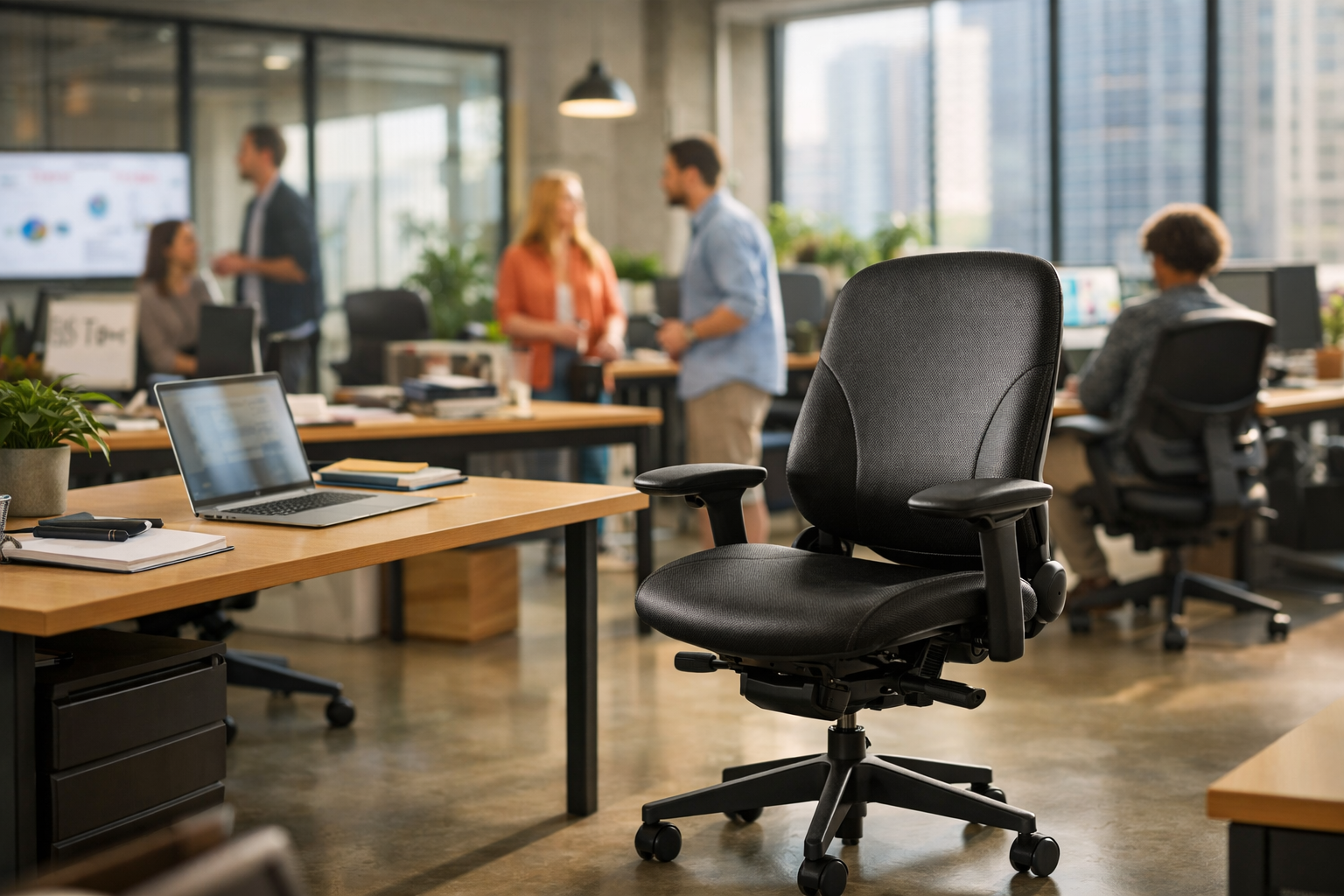
Why Startups Are Budgeting for a Steelcase Leap Office Chair in 2026
Key Takeaways
- Treat the Steelcase Leap office chair as an operating cost, not a perk—teams doing 8-to-12-hour desk work usually lose more money to back pain, fatigue, and cheap chair replacements than they save upfront.
- Compare movement support, not just specs: the Steelcase Leap office chair stands out because LiveBack, adjustable seat depth, and 4D arms keep programmers, designers, and writers supported as they shift positions all day.
- Test the Leap against real alternatives—Aeron, Amia, Gesture, and gaming chairs all fit different bodies, but the Steelcase Leap office chair often wins for all-day comfort if you need stronger lower back support and a cushioned seat.
- Inspect the basics before buying any new or certified pre-owned Steelcase Leap office chair: check recline tension, arm stability, wheels, seat cushion wear, and how it rolls on carpet or hard floors.
- Set up the chair in the right order—seat height, seat depth, lumbar firmness, and reclining tension—because even a comfortable ergonomic chair can feel wrong if the adjustments are off.
- Match the chair to your work style: a Steelcase Leap office chair is usually a strong fit for long coding, writing, and design sessions, but a mesh chair or a different steelcase model may work better if you run hot or prefer firmer support.
A startup can burn through three cheap chairs in 24 months and still hesitate at one steelcase leap office chair. That’s backwards. For teams spending 8 to 12 hours a day at a desk, chair quality isn’t a perk anymore—it sits in the same budget conversation as laptops, monitors, and health coverage.
The shift is showing up for a reason. Founders are watching back pain cut into focus, designers are feeling shoulder tension by noon, and programmers know the drag of a cushion that collapses halfway through a sprint. In practice, a bad chair doesn’t just feel annoying—it changes posture, shortens attention span, and keeps people fidgeting instead of working. The Leap keeps coming up because it solves a plain, expensive problem: long-hour sitting needs movement, not just padding. And in hybrid setups—where a home office now doubles as the main office for a lot of knowledge work—that difference starts to look less like a luxury and more like basic equipment.
Why the steelcase leap office chair is moving from perk to budget line item
Why are startup founders suddenly treating seating like a finance decision instead of an office perk? Because after 8 to 12 hours at a desk, a bad chair stops being a comfort problem and starts hitting output, focus, and retention.
Why 8-to-12-hour desk work is making chair quality a finance issue
The steelcase leap office chair keeps coming up for a simple reason: long coding blocks, design reviews, and back-to-back calls punish the spine fast. In practice, teams comparing a steelcase leap v2 office chair against cheaper chairs usually notice the same thing—better lumbar support, more adjustable arms, and less end-of-day fatigue.
How startup teams are rethinking the cost of back pain, fatigue, and cheap chairs
A $300 chair that feels comfy for two weeks can turn expensive by month six. The honest answer is that a steelcase leap chair for back pain gets attention because lower back strain, neck tension, and poor posture cost more than a line item in the equipment budget.
- Seat depth matters for tall users and leg circulation
- Reclining support matters during long hours of reading and review work
- Adjustable arms help reduce shoulder load at the desk
Why the steelcase leap office chair keeps showing up in home office and hybrid setups
Hybrid work changed the math. A steelcase leap home office chair has to handle focused writing, gaming after hours, and video calls in one modern setup—without turning the lower back into the weak link.
And budget buyers still compare the steelcase leap v1 office chair with newer models because durable ergonomic chairs hold up better than disposable options (even on carpet, with heavy daily use). One brief note from Madison Seating echoes what ergonomics consultants see often: premium seating isn’t a luxury purchase anymore. It’s basic infrastructure.
What makes the steelcase leap office chair different from other ergonomic office chairs
Write this section as if explaining to a smart friend over coffee—casual but accurate and specific. The steelcase leap office chair stands out because it supports movement, not just posture at one frozen angle. That matters for people at a desk 8 to 12 hours a day, especially programmers, designers, and writers who shift between typing, reading, and reclining.
LiveBack support and why spinal movement matters more than static lumbar pads
Here’s what most people miss: static lumbar pads can feel good for 20 minutes and annoying by hour four. The steelcase leap chair for back pain works better because LiveBack flexes with the spine as posture changes—upright for code review, slightly reclined for reading, forward again for a draft.
Natural Glide, adjustable seat depth, and 4D arms for programmers, designers, and writers
Natural Glide keeps the user closer to the desk while reclining, which helps preserve screen distance and shoulder position. Add adjustable seat depth and 4D arms, and the fit gets much tighter than most chairs.
- Seat depth: better thigh support for tall users
- 4D arms: easier wrist alignment for keyboard and mouse work
- Reclining control: more comfy during long hours
Upholstery choices—fabric, leather, and breathable options—and what they change during long hours
Fabric usually feels best for all-day office use, leather runs warmer, — breathable upholstery tends to win for home setups where climate control isn’t perfect (and that’s common). The steelcase leap v2 office chair is often preferred for its refined cushion and updated back feel.
Which body types and work styles usually fit the Leap best
The Leap usually fits average to tall users, people with recurring back pain, and anyone who changes posture often. Buyers comparing generations still look at the steelcase leap v1 office chair, while remote workers often search for a steelcase leap home office chair that feels comfortable without looking like a gaming seat.
Steelcase Leap vs Aeron, Amia, Gesture, and gaming chairs: where it actually wins
Roughly 7 out of 10 desk workers who struggle with sitting comfort don’t need a softer cushion—they need a chair that keeps the spine supported while it moves. That’s where the steelcase leap office chair keeps beating flashier chairs in real work settings, especially for programmers, writers, and designers logging long hours at a desk.
Steelcase Leap office chair vs Herman Miller Aeron for lower back support and all-day comfort
The Aeron is breathable, refined, and still one of the best mesh chairs sold for modern office use. But for lower back support, the Leap usually wins—its back flexes with the user instead of asking the user to fit the frame. In practice, that matters more by hour six than it does in a 10-minute review. For buyers searching steelcase leap chair for back pain, that dynamic support is the real reason it stays in the conversation.
Leap vs Steelcase Amia and Gesture for startups buying at different budget levels
The steelcase leap v1 office chair still has a loyal following because it’s durable, comfy, and mechanically simple. The steelcase leap v2 office chair adds a more refined back, better adjustable arms, and a cleaner fit for home office or cross-team startup setups. Amia works if budget is tighter. Gesture fits tall users and heavy device switching better—but it usually costs more.
Why gaming chairs, headrest add-ons, and footrest setups still miss the posture problem
Gaming chairs often look aggressive in white, brown, or leather, with reclining features, wheels for carpet, and even a footrest. Still, they usually miss the core ergonomic issue: the back needs to move with the body—not just lock it in place. A steelcase leap home office chair does that better than most gaming or headrest-first designs. That’s the difference. And it shows up fast.
Is the steelcase leap office chair worth the price in 2026? The buying question startups are really asking
Yes—if the chair survives real work.
The tension for startups isn’t sticker shock alone; it’s whether a steelcase leap office chair holds up through long hours at a desk better than cheaper chairs that feel comfy for 30 days, then flatten out and start feeding back pain. In practice, the honest answer is yes. A properly fitted steelcase leap home office chair usually costs less over time than replacing a flashy gaming or mesh model every 12 to 18 months.
New vs certified pre-owned steelcase leap office chair: what buyers should inspect before paying
A steelcase leap v2 office chair still makes sense in 2026 because the back flex, adjustable arms, — reclining control support posture without pushing the user away from the desk. And a steelcase leap v1 office chair can still be a smart buy—older, yes, but often built like a tank.
Total cost over five years compared with replacing cheaper office chairs every 12 to 18 months
Run the math. One $300 chair replaced four times in five years lands at $1,200, and that’s before lost work from sore shoulders or leg numbness. A Leap bought once—even at a higher price—usually wins.
Worth pausing on that for a second.
What to check for on wheels, arms, recline, cushion, and carpet performance before purchase
Check these before paying:
- Wheels: smooth roll on carpet, no wobble
- Arms: height and width lock firmly
- Recline: tension adjusts evenly—no jerks
- Cushion: no sag, no hard seat pan pressure
- Back support: the steelcase leap chair for back pain only works if lumbar firmness still responds
How startups should choose and set up a steelcase leap office chair for real work
A product designer joins a 10-hour sprint, loves the chair at first sit, then feels lower back pressure by 3 p.m. Another founder blames the desk setup, but the real issue is adjustment order. That happens constantly with a steelcase leap office chair—it’s highly adjustable, and that’s exactly why sloppy setup backfires.
Best adjustment order for seat height, seat depth, lumbar firmness, and reclining tension
Start with the body, not the marketing sheet. In practice, the best sequence is:
- Seat height: feet flat, knees near 90 degrees, thighs supported.
- Seat depth: leave 2-3 fingers behind the knees.
- Lumbar firmness: increase until the lower back feels supported, not pushed forward.
- Reclining tension: firm enough to support movement, loose enough to avoid bracing.
The steelcase leap v2 office chair makes this easier for mixed teams because the back moves with the spine during long hours at a desk. A steelcase leap v1 office chair still works well for startups that want proven mechanics and a slightly denser feel.
Common setup mistakes that make even a comfortable chair feel wrong
- Seat depth too long—cuts into circulation.
- Arms too high—drives shoulder and neck tension.
- Lumbar maxed out—common mistake, bad result.
Even a steelcase leap chair for back pain can feel wrong if the monitor is too low or the user parks upright all day without changing posture.
When the Leap is the best choice for a home office—and when another chair may fit better
The steelcase leap home office chair is a strong fit for programmers, writers, and designers who shift between upright typing and reclining review work. But here’s the thing—users who run hot may prefer mesh, and taller workers who want a headrest for frequent reclining may compare it against a Gesture or Herman Miller option instead.
Frequently Asked Questions
Is the Steelcase Leap a good chair?
Yes—the Steelcase Leap office chair is one of the strongest picks for people who sit for long hours at a desk. Its biggest strength is how well it supports movement: the back flexes with the spine, the seat depth adjusts, and the arms can be dialed in far better than most office chairs. For programmers, writers, and designers who shift positions all day, that matters more than flashy looks.
What chair does Joe Rogan use?
Joe Rogan has been seen using a few different chairs over the years, — online discussions often point to models from Herman Miller and other premium brands. But that question misses the real issue: the best chair for a podcast studio isn’t always the best ergonomic chair for 8 to 12 hours of focused desk work. If someone is comparing the Steelcase Leap office chair to a Herman Miller option, fit and adjustability should matter more than celebrity setups.
Can an ergonomic chair help with sciatica?
It can help, yes—but it isn’t a magic fix. A properly adjusted ergonomic chair like the Steelcase Leap office chair can reduce pressure on the lower back, support a more neutral pelvis, and make it easier to avoid the slumped posture that often aggravates sciatic pain. In practice, seat depth, lumbar firmness, and recline tension usually matter more than extras like a headrest or leather upholstery.
What is the Rolls-Royce of office chairs?
There isn’t one single answer, — anyone claiming there is is oversimplifying it. The usual names are the Steelcase Leap, Steelcase Gesture, Herman Miller Aeron, and sometimes the Embody—each is premium, each suits a different body and work style. For all-day keyboard and mouse work, the Leap is often the smarter choice because its back support is more forgiving and its adjustments are more useful day to day.
Is the Steelcase Leap better than the Herman Miller Aeron?
For most people doing long hours at a home office desk, yes, the Leap is easier to live with. The Aeron has great mesh airflow and a distinct feel, but its fixed frame and firmer seat profile can be less forgiving for people who tuck a leg under, cross their legs, or shift a lot. The Steelcase Leap office chair works better for users who want a more adaptable seat and back—not just a chair that looks iconic.
This is the part people underestimate.
Does the Steelcase Leap work for back pain?
Usually, yes. The Leap’s LiveBack system and lower back firmness control help keep the spine supported while still allowing small movements, which is exactly what most desk workers need. It won’t cure back pain on its own, but a badly fitted chair can make pain worse fast—and this one gives users enough adjustment to avoid that trap.
Is the Steelcase Leap comfortable for tall users?
Often it is, especially because the seat depth adjusts and the back has enough height for a wide range of body types. Tall users should pay close attention to thigh support, arm width, and whether they need a headrest, since the standard back may feel a little low for reclining breaks. For focused office work, though, the Leap usually fits tall users better than cheaper chairs that only adjust seat height.
Is the Steelcase Leap good for gaming and home office use?
Absolutely. A lot of gaming chairs look aggressive but fall apart on the basics: arm positioning, lumbar support, and comfort after four or five hours. The Steelcase Leap office chair is less flashy, more adjustable, and far more comfortable for long sessions—whether that’s coding, editing, gaming, or back-to-back meetings.
Should buyers choose the Steelcase Leap with a headrest?
Only if they know they’ll use it. For upright desk work, a headrest usually doesn’t do much because the head should stay balanced over the shoulders, not pressed back into a cushion. But for users who spend time reclining to read, take calls, or watch content, a headrest can be a worthwhile add-on (just not the first feature to prioritize).
The data backs this up, again and again.
What should buyers check before choosing a Steelcase Leap office chair?
Start with the adjustments that affect posture: seat depth, lumbar firmness, arm movement, and recline tension. Then check practical details like wheels for carpet or hard floors, upholstery type—fabric, leather, or another finish—and whether the chair suits the way they actually sit. That’s the part most people skip, and it’s why they end up with an expensive chair that still doesn’t feel right.
That shift is why the smartest startups aren’t treating seating like office decor anymore. They’re treating it like infrastructure. A bad chair doesn’t just annoy people; it drains focus, pushes workers into sloppy posture, and quietly adds replacement costs every year a cheap model breaks down. The steelcase leap office chair keeps entering 2026 budgets for a simpler reason: it supports movement instead of locking the body into one position, and that matters when developers, designers, and writers are planted at a desk for 8 to 12 hours at a stretch.
There’s also a buying lesson here—one finance teams tend to miss at first. Sticker price alone tells a pretty useless story. What matters is five-year cost, adjustment range, and whether the chair still works after thousands of sit-stand cycles, late-night pushes, and back-to-back meeting days. And setup counts just as much as spec sheets (arguably more). A poorly adjusted premium chair can feel worse than it should.
The next step should be concrete: audit the chairs the team is using right now, calculate replacement frequency over the past 24 months, and compare that number against one new or certified pre-owned Leap per full-time desk worker before the next budget cycle closes.
For more great reading, visit our site and explore related topics.

