
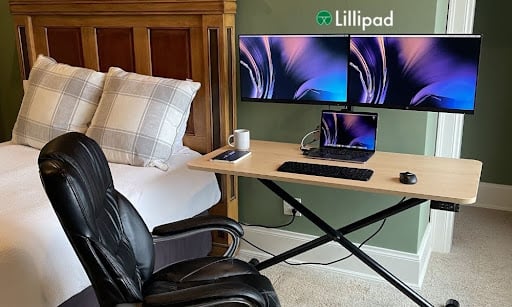
Can a Foldable Standing Desk Support Dual Monitors?
Setting up two screens on a foldable standing desk for small spaces sounds complicated, but it depends on three things: weight capacity, surface size, and mounting options. Many foldable desks are built for light use, but some are engineered to handle full workstation loads. Understanding what separates a capable dual-monitor setup from a wobbly one saves you from making a costly mistake. This guide breaks down the exact specs and hardware you need to run two monitors on a foldable desk without compromising stability or your workspace.
What Weight Capacity Does a Dual-Monitor Setup Actually Need?
Two monitors can add up fast in terms of load. A typical 27-inch monitor weighs between 12 and 17 lbs. Two monitors, a laptop, keyboard, and accessories can push 50 to 60 lbs total on the desktop surface.
Most consumer folding desks are rated for 30 to 50 lbs. That range is too close to the limit for safe, long-term use with dual screens. Look for a desk rated for at least 75 lbs operational load. The Lillipad foldable electric standing desk carries a 75 lb operational rating and has been static load tested to 350 lbs, which gives a wide safety margin even with a full multi-screen rig.
Does Desktop Size Matter for Dual Monitors?
Surface area directly affects whether two monitors can sit at a usable distance apart. A 24-inch-wide desk fits one monitor comfortably. For two screens, you need at least 46 inches of width.
The Lillipad Standard model measures 46″ x 24″ and the Large model is 52″ x 25″. Both can fit two 24 to 27-inch monitors side by side. Desk depth also matters. A 24-inch depth keeps monitors far enough back to reduce eye strain, which aligns with the American Optometric Association guideline of 20 to 28 inches of viewing distance for screen work.
Monitor Arms vs. Flat Placement: Which Is Better?
Placing two monitors directly on the desktop consumes nearly all usable surface space. Monitor arms solve this by lifting screens off the desk and mounting them to the frame, freeing up the full work surface below.
The Lillipad foldable electric standing desk includes an integrated monitor mount built into the frame. Lillipad also sells a dedicated dual monitor arm that uses a universal VESA 75×75 and 100×100 mounting plate, compatible with most screens. This setup keeps both monitors at eye level and leaves the desktop clear for a keyboard, laptop, or notepad.
How Does a Foldable Desk Maintain Stability With Heavy Loads?
Stability under load is the biggest concern with foldable designs. Most folding legs use simple hinge joints, which flex under heavier weight at standing height.
The Lillipad uses a patented X-frame design. This structure distributes load across a wider base footprint rather than concentrating it at a single pivot point. The desk is Intertek certified and conforms to the UL962 Standard for small office and home office furnishings. It has passed 3,000 consecutive raise and lower cycles at a 75 lb load, confirming that it holds up under repeated use with full monitor setups in place.
What About Cable Management With Two Monitors?
Two monitors mean twice the cable volume, which gets messy fast when a desk needs to move or fold. Cables that bunch up near the base can snag during height adjustment and pull monitors off-arm.
The Lillipad PRO model includes integrated cable concealment panels and a cable management net built into the frame. The base also includes a built-in surge protector with 3 AC outlets, 3 USB ports, and 1 USB-C port. This keeps power accessible at the desk without running extension cords across the floor, which is a common hazard with foldable standing desk for small spaces setups that move frequently.
Can You Fold and Store the Desk With Monitors Still Attached?
Most users remove monitors before folding and storing their desk. Folding with mounted monitors still attached risks stress on the arm joints and can scratch or knock the screens during the fold.
The Lillipad monitor arms use a quick-release mechanism. This means both arms can be detached in seconds without tools before folding the desk down to its 6-inch collapsed profile. The full folded unit slides under a bed, behind a couch, or into a closet. For apartment dwellers and studio users, this allows a complete foldable standing desk for small spaces workstation to disappear entirely after hours.
What Should You Check Before Buying a Foldable Desk for Dual Monitors?
Before purchasing, run through this checklist:
- Operational weight rating: Minimum 75 lbs for a dual-monitor setup
- Desktop width: At least 46 inches to fit two 24-to-27-inch monitors
- Monitor mounting options: VESA-compatible arm or integrated mount on the frame
- Frame design: X-frame or similar triangulated structure for lateral stability
- Cable management: Built-in channels or a power strip to reduce floor cable clutter
- Fold height: 6 inches or less for storage under standard furniture
According to ergonomics guidelines from Cornell University’s Human Factors and Ergonomics Research Group, dual-monitor setups should position the primary screen directly in front and the secondary screen at a slight angle to reduce neck rotation. A desk with monitor arm support helps achieve this configuration.
Does a Height-Adjustable Foldable Desk Work Better for Dual Monitors?
Fixed-height folding desks lock you into one position. If your monitors are arm-mounted, a fixed desk height means the screens stay at the same level whether you sit or stand, which is rarely ergonomically correct for both postures.
A height-adjustable foldable desk lets you recalibrate the whole workstation as you change positions. When sitting, elbows should rest at 90 degrees with the keyboard at desk level and the top of the monitor at or just below eye level. When standing, the desk rises to meet those same angles. The Lillipad adjusts from 13.5 inches (working height with tabletop) up to 42 inches on the Standard model and 48 inches on the Large model, covering seated floor work, chair sitting, and full standing. That range accommodates users from around 5’2″ to over 6’4″ across all three positions. A foldable standing desk for small spaces that also adjusts height removes the need to own two separate desks for sitting and standing work.
Running two monitors on a foldable desk is fully achievable when the desk is built to handle the load. The key variables are weight capacity, frame stability, surface dimensions, and integrated mounting hardware. A desk that combines all four removes the tradeoffs that come with standard lightweight folding desks.
Explore Lillipad’s electric standing desk options to find the right configuration for a dual-monitor home office setup.

